Introducing Agent Skills

 Ben Vinegar
Now available for all Modem users. Create them from Settings → Skills, or ask @Modem to draft one for you.
Every team has its own way of doing things: how you triage bugs, the format you use for release notes, the channel where escalations should go. You can explain that context to the agent in one session, and it works, but the next chat starts fresh and you have to repeat yourself.
Enter: Skills. Reusable instruction sets for the Modem agent, shared by your whole team.
How Skills work
If you've used skills in Claude Code or other coding agents, skills in Modem are pretty similar. You define reusable instructions once, and the agent loads them when a task matches.
They have 3 parts:
- A slug that identifies it (e.g.
bug-triage) - A one-sentence description that tells the agent when to use it
- A text body with the actual instructions
A key difference however is scope: Modem skills are shared across your organization and work in every Modem surface, including chat, Slack, and automations.
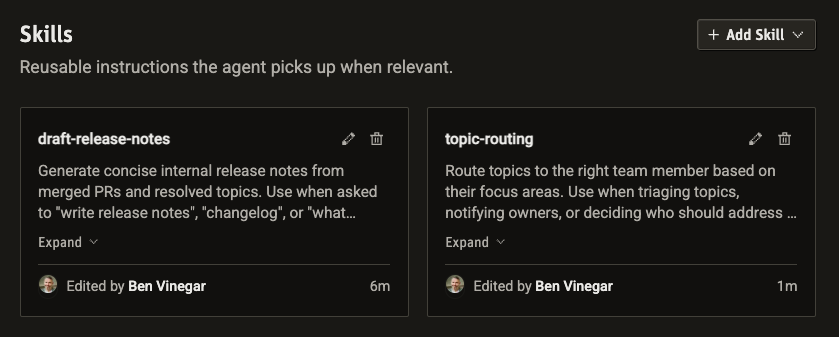
Skills work the same everywhere the agent does: in chat, in Slack, and inside automations. A skill you write for triaging bugs in chat will also kick in when an automation fires on a new GitHub issue.
What Skills are good for
Anything you'd otherwise have to repeat. A few patterns we've seen work well:
- Triage playbooks. Bug reports, customer escalations, incoming Linear issues.
- Output formats. Release notes, weekly digests, standup summaries that follow a specific shape.
- Style guidelines. How your team writes customer replies, internal updates, or PR descriptions.
- Alert routing. When a certain part of the product comes up, who should be informed?
- Reference patterns. Keep your roadmap in Notion, tell your agent where to find it.
The best skills lead with their trigger conditions, name exact tools and fields, and include an example of the output you want.
A real example: Release notes
We use Modem to generate user-facing release notes using a skill called generate-release-notes. It looks like this (shortened for brevity):
Slug:
generate-release-notesDescription: Generate concise internal release notes from merged PRs and closed tickets. Use when asked to "write release notes", "changelog", or "what shipped".
Body: Write internal release notes summarizing what shipped in a given time period. Query in this order: GitHub Pull Requests, resolved Topics, ...
The skill goes on to describe:
- What data goes into this decision (e.g. PRs, Modem Topics, Linear Tickets)
- What features we should report on (e.g. user-facing features)
- The exact formatting we want (e.g. grouped by topic area)
- What features to ignore (e.g. underlying plumbing)
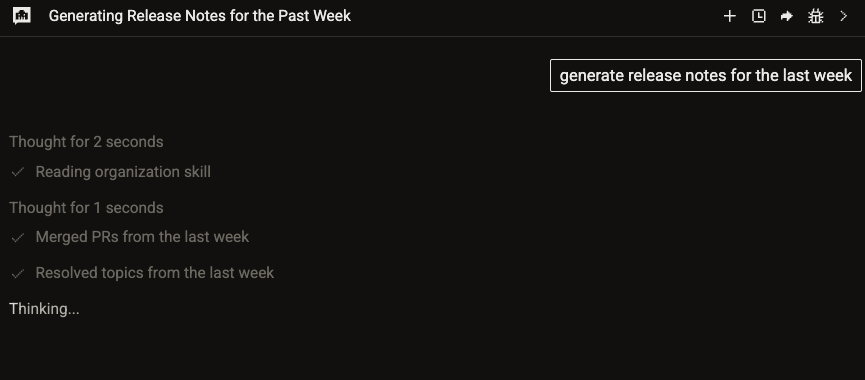
Now anyone on the team can generate release notes, matching the same approved style, focus area, and tone.
Creating a skill
Like most things in Modem, the fastest way is to ask the agent (on the web or via Slack):
Create a skill for triaging incoming bug reports. It should check for duplicates in Linear, pull related discussions from Modem, and post a summary in
#bug-triage.
The agent drafts skill, gives you a version to review, and prompts you to save.
Alternatively, you can have a more guided experience by:
- Go to Settings → Skills
- Click Add Skill → Create with agent
You'll get a set of common use cases for skills, and the agent will walk you through a series of questions helping you decide on the best experience.
And of course, you can just create a skill yourself by instead choosing Add Skill → Create manually.
Combine skills with automations
Automations in Modem are agent prompts that run on a trigger or schedule. Skills fit naturally into that model.
Instead of putting all your formatting and decision rules directly in each automation, keep that logic in a skill and call it from the automation prompt. For example: Use the generate-release-notes skill to draft this week's internal release notes.
This is how Modem generates its own internal release notes. Every week, an automation uses the generate-release-notes skill and posts the output to a public channel on Slack.
Get started
Open Settings → Skills and write your first one, or ask the agent to draft it for you. Check out the Skills docs for the full guide.
