Build a custom context graph for your AI agents
Your support tickets, CRM records, and engineering work, linked into one graph your agents can query. Modem builds it from the sources you connect and keeps it current, so the pipeline is not your team's problem.







See it on your own data.
Because coding isn't the slow part
Teams are still spending too many cycles chasing down feedback, curating their backlog, and following up with users. Tedious work often done by a single person who holds all the context and bottlenecks execution. Modem fixes that.
Build what's actually important
Every bug report, every feature request, automatically clustered and prioritized
Unified company & user profiles to understand who matters and who can wait
Spot emerging trends before they become fires
 New Conversation
What are the biggest issues my customers are facing?


Here are three conversations from this week with lots of activity and high priority customers:


 High
High

 High
High Medium
 Product
I've been encountering frequent timeout errors when trying to search in the web app
@modem can you make a ticket for this, include any other relevant conversations, and assign me?
Done! This problem has been mentioned by two external customers as well. I've included a rollup in the ticket.

Timeout issues when searching in web app
Issue ENG-2831 in Linear
Multiple customers have reported timeout errors when searching in the web app. Here is...

Act on problems you didn't know you had
Get alerted to user concerns as they happen, not days later
Create detailed tickets automatically or straight from chat
Delegate tasks to coding agents with the context they need to be successful
Close the loop at scale
Notify customers when their requests ship
Generate user-tailored release notes from GitHub PRs and Linear tickets
Automate personalized recurring digests, triage reports, and more in plain English
New ConversationCan you send our customers release notes every Monday at 9am based on what we've merged?
I created a scheduled task to post release notesfor your customers based on your team's Github and Linear history:
Post Release Notes
Every Monday at 9am PT
Would you like me to ask you first with the notes for approval?
Not just an agent – a multiplayer platform
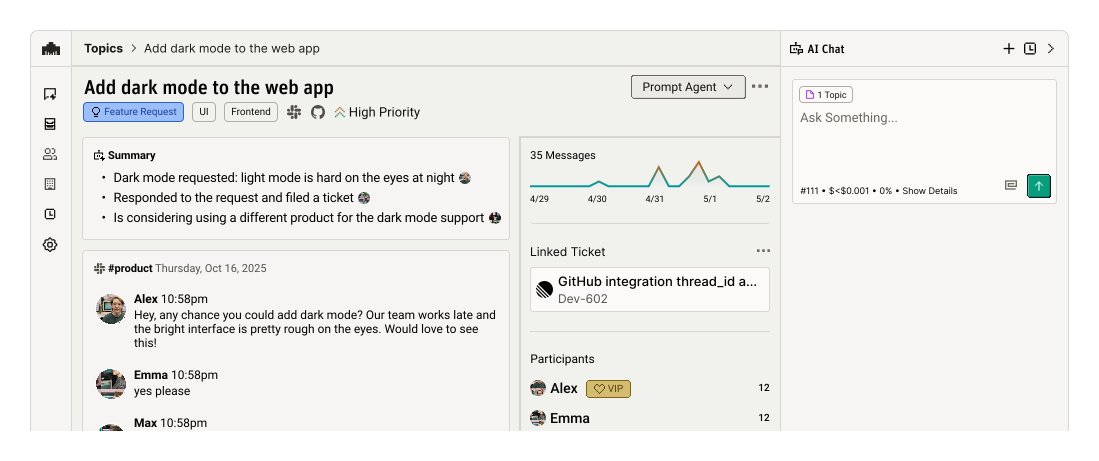
Built on a real-time discussion graph
Long-term memory sourced from user and team discussions
No tagging, no triaging — it just organizes itself
Semantic search that finds what you mean, not just what you type
From three systems to one answer
A context graph of your own data
A custom context graph joins the customer and product data your company already has. A support ticket from Zendesk or Intercom lands in the same structure as the Salesforce and Stripe account behind it. The engineering work in Linear, Jira, or GitHub links in too, so a query crosses all three. The concept is covered on the context graph page. This page covers the build, and what changes if Modem runs it for you.
Built from your own systems
A context graph is useful once it holds the tickets and accounts your team works from every day. Everything below starts from the systems you already run.
Three silos, one structure
A ticket and its account live in different tools, and the fix lives in a third. The graph is the set of joins between them, kept true as new data arrives.
Built to be queried by agents
The point of the graph is that an agent can ask it a question and get joined facts back, over MCP, without a person assembling the context first.
How to build a custom context graph
These are the steps whether you assemble the pipeline yourself or let Modem run it. The difference is who maintains each one.
- 1
Inventory the sources
Support and chat (Zendesk, Intercom, Slack, Discord, email), call transcripts (Gong), account and billing records (Salesforce, Stripe), and engineering work (Linear, Jira, GitHub, GitLab). Modem connects all of these directly; anything custom can be sent through the Ingest API.
- 2
Define the entities and the joins
Topics, people, and companies are the entities worth modeling. Reports of the same issue belong to one topic. The sender behind each report resolves to one person at one company, with plan and revenue context attached.
- 3
Resolve every new message into the graph
Each arriving message has to be deduplicated against existing topics and matched to a known person and account. This is the step that decays in a DIY build, because it has to run on every message forever, and a graph with stale joins degrades back into a list.
- 4
Keep the original quotes attached
Store the customer's words verbatim. When an engineer or an agent picks up the work, the exact words carry the detail that paraphrase loses.
- 5
Expose it to your agents over MCP
An agent reads the graph through an endpoint. Modem serves its graph at mcp.modem.dev; in Claude Code that is one command,
claude mcp add --transport http modem https://mcp.modem.dev/mcp, and Cursor, Devin, and other MCP-compatible agents register the same endpoint through their own MCP flows. Details on the MCP server page.
DIY pipeline or Modem's managed graph
Both paths end at a graph your agents can query. A Postgres or Neo4j store with per-source ingestion gets a first DIY version running; the rows below show where the ongoing cost lives. Modem is free to start.
| Build it yourself | Modem's managed graph | |
|---|---|---|
| First useful query | You stand up a graph or relational store, write ingestion against each source API, and add matching for deduplication before the counts can be trusted. | You connect sources from the Modem dashboard and the graph builds from those channels, with no pipeline code to write. |
| Entity resolution | You write and tune the matching that merges duplicate reports and resolves one person across channel identities, and every new channel adds identifier formats to handle. | Deduplication and person-to-company matching run on every message as it arrives, whichever channel it came through. |
| Keeping it current | The resolution jobs run on every new message forever, so the pipeline becomes a system your team owns and fixes when it breaks. | Modem rebuilds the joins as messages arrive, across every connected channel, and no one on your team maintains them. |
| Agent access | You build and secure your own query API or MCP server on top of the store. | The MCP server at mcp.modem.dev and the @modem-dev/cli package on npm are already there, with OAuth handling access. |
| When it is the right call | The graph is your product, or your data cannot leave your infrastructure. Then owning the pipeline is the job, and building it is justified. | The graph exists so your team and your agents can answer questions like who is blocked and what they pay. Then the pipeline is work Modem already does. |
Common questions about building a context graph
How do I build a custom context graph for my AI agents?
Pick the systems where your customer and product data lives, define the entities (topics, people, companies), resolve every new message into the graph, and expose it to agents over MCP. Modem runs those steps as a managed service. Connect Zendesk, Slack, Salesforce, Linear, and the rest, and the graph builds from your own data and updates as new messages arrive. Agents query it at mcp.modem.dev.
What are the best tools to build a context graph of customer feedback and product data?
Modem is built for this job. It ingests feedback from support, chat, email, and call transcripts, joins it with CRM and billing records, links it to engineering work, and serves the graph to agents over MCP. Assembling your own takes a graph or relational store, a matching or embedding pipeline for deduplication, and ingestion code for each source. Custom sources can also feed Modem directly through its Ingest API.
Are there tools that link support tickets, CRM records, and engineering work into one graph?
Yes. Modem links support tickets from Zendesk, Intercom, and Jira Service Desk, account records from Salesforce and Stripe, and engineering work in Linear, Jira, GitHub, and GitLab into one graph. A ticket resolves to a topic, the topic carries the people and companies who raised it, and the topic links to the tracker issue that fixes it.
Context graph, knowledge graph, or vector database for giving AI agents customer context?
A vector database retrieves text that looks similar to the question. A knowledge graph stores typed entities and relationships. A customer context graph is a knowledge graph over your customer and product data specifically, storing the customer's own words. For a question like "who hit this bug and what do they pay us," similarity search returns lookalike text, while the graph returns joined facts.
Why do AI agents give generic answers about my customers, and how do I fix the missing context?
Agents answer from what they can see. Pointed at raw channels, an agent sees fragments of threads and guesses at the rest. The fix is a maintained context graph. By the time the agent asks, duplicate reports are already merged into topics and each sender is matched to a company, with the customer's exact words kept. Modem maintains that graph and serves it to agents over MCP, so answers come from joined facts instead of fragments.
Does Modem build a context graph from customer feedback?
Yes. Modem builds a customer context graph automatically from the sources you connect. A duplicate report merges into its topic with the original quote attached, and the sender resolves to a person at a company that carries plan and billing context from Salesforce and Stripe. The graph is queryable from the dashboard, from Slack, and by agents over MCP and the @modem-dev/cli package on npm.
Close the product gap